Plots
NCA.jl ships Makie recipes for the input data, the analysis results and the dose linearity models. Each one returns a Makie.Figure and takes either the parsed input data frame or the run_nca result, depending on what it plots. CairoMakie comes with NCA.jl, so there is no separate backend to load.
Every recipe also has an interactive Plotly counterpart, obtained by passing the figure specification through interactive.
using NCA, PharmaDatasets, DataFrames, Unitful

df = dataset("nca/dapa_IV_ORAL")
df[!, :route] .= map(f -> f == "ORAL" ? "ev" : "ivbolus", df.FORMULATION)

nca_data = read_nca_pumas(
    df;
    id = :ID,
    time = :TIME,
    concentration = :COBS,
    dose = :AMT,
    route = :route,
    time_unit = u"hr",
    concentration_unit = u"mg/L",
    dose_unit = u"mg",
    group = [:OCC],
)
results = run_nca(nca_data)
Checking groups
groups_check(nca_data)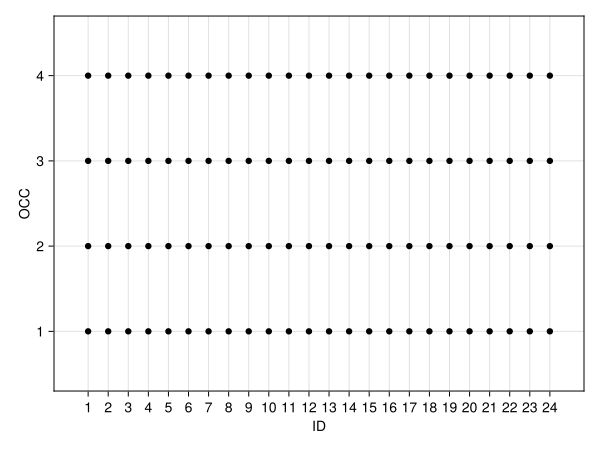
NCA.groups_check — Function
groups_check(input_df | report_df)
groups_check(figpos, input_df | report_df)
Keywords
group: Select which group from stratified input data to plot.paginate: (defaultfalse) Whentruesets the return type of a plot to aVector{AlgebraOfGraphics.FigureGrid}rather than a singleAlgebraOfGraphics.FigureGrid, splitting the returned plot over several "pages" if there are too many to fit on a single figure comfortably. See alsolimit,rows, andcolumnsfor controlling page size and grid shape.limit: Sets the maximum number of axes that can be plotted per page when pagination is active. Cannot be combined withrowsandcolumns.rows: Sets the number of rows per page when pagination is active. For plots with alayoutscale, must be specified together withcolumns. The grid shape is controlled viaAlgebraOfGraphics.wrapped(; cols = columns)and the page limit is computed asrows × columns. For plots withrow/colscales, translates directly to the corresponding pagination parameter.columns: Sets the number of columns per page when pagination is active. For plots with alayoutscale, must be specified together withrows. The grid shape is controlled viaAlgebraOfGraphics.wrapped(; cols = columns)and the page limit is computed asrows × columns. For plots withrow/colscales, translates directly to the corresponding pagination parameter.axis: A key-value object with axis options that gets passed to the underlyingAlgebraOfGraphics.drawcall.figure: A key-value object with figure options that gets passed to the underlyingAlgebraOfGraphics.drawcall. (Does not apply when plotting into an existing figure.)legend: A key-value object with legend options that gets passed to the underlyingAlgebraOfGraphics.drawcall. (Does not apply when plotting into an existing figure.) A legend will be drawn automatically unlesslegend = (; show = false)is set.facet: A key-value object with facet options that gets passed to the underlyingAlgebraOfGraphics.drawcall.colorbar: A key-value object with colorbar options that gets passed to the underlyingAlgebraOfGraphics.drawcall. (Does not apply when plotting into an existing figure.)
Supported Style Keywords
colormarkersize
Observations over time
observations_vs_time(nca_data; ids = [1, 2])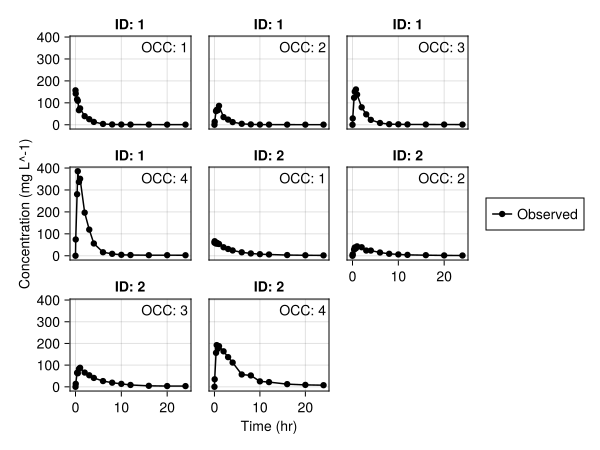
PlottingUtilities.observations_vs_time — Function
observations_vs_time(input_df | report_df)
observations_vs_time(figpos, input_df | report_df)
Keywords
llq: Set to a numeric value to display a horizontal line indicating the Lower Limit of Quantification (LLQ). Defaults tonothing(no line).ids: Select which subject IDs to display. Can be either a single ID or aVectorof IDs. Note that the type of the ID must match those in the population, i.e. a value1is not the same as a"1".labels: The custom name to use for each individual series within in the plot such as a scatter or line. Provide aNamedTuplewith any of the following keys and your custom label string:observed.paginate: (defaultfalse) Whentruesets the return type of a plot to aVector{AlgebraOfGraphics.FigureGrid}rather than a singleAlgebraOfGraphics.FigureGrid, splitting the returned plot over several "pages" if there are too many to fit on a single figure comfortably. See alsolimit,rows, andcolumnsfor controlling page size and grid shape.limit: Sets the maximum number of axes that can be plotted per page when pagination is active. Cannot be combined withrowsandcolumns.rows: Sets the number of rows per page when pagination is active. For plots with alayoutscale, must be specified together withcolumns. The grid shape is controlled viaAlgebraOfGraphics.wrapped(; cols = columns)and the page limit is computed asrows × columns. For plots withrow/colscales, translates directly to the corresponding pagination parameter.columns: Sets the number of columns per page when pagination is active. For plots with alayoutscale, must be specified together withrows. The grid shape is controlled viaAlgebraOfGraphics.wrapped(; cols = columns)and the page limit is computed asrows × columns. For plots withrow/colscales, translates directly to the corresponding pagination parameter.axis: A key-value object with axis options that gets passed to the underlyingAlgebraOfGraphics.drawcall.figure: A key-value object with figure options that gets passed to the underlyingAlgebraOfGraphics.drawcall. (Does not apply when plotting into an existing figure.)legend: A key-value object with legend options that gets passed to the underlyingAlgebraOfGraphics.drawcall. (Does not apply when plotting into an existing figure.) A legend will be drawn automatically unlesslegend = (; show = false)is set.facet: A key-value object with facet options that gets passed to the underlyingAlgebraOfGraphics.drawcall.colorbar: A key-value object with colorbar options that gets passed to the underlyingAlgebraOfGraphics.drawcall. (Does not apply when plotting into an existing figure.)
Supported Style Keywords
- `color`
- `linestyle`
- `linewidth`
- `markercolor`
- `markersize`
- `group_fontsize`
- `llq_color`: Color of the LLQ line (default: `Makie.automatic`).
- `llq_linestyle`: Linestyle of the LLQ line (default: `Makie.automatic`).
- `llq_label`: Label for the LLQ line in the legend (default: "LLQ").
- `llq_linewidth`: Linewidth of the LLQ line (default: `Makie.automatic`).
Summarized observations over time
summary_observations_vs_time(nca_data)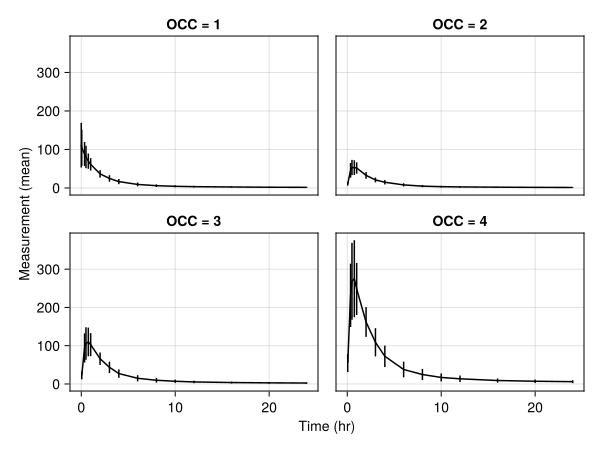
NCA.summary_observations_vs_time — Function
summary_observations_vs_time(input_df)
summary_observations_vs_time(figpos, input_df)
Keywords
statistic: Select whether to use:meanor:geomeanfor the statistic.errorbars: Set tofalseto hide error bars.separate: Set tofalseto overlay all groups on a single axis.show_subjects: Set totrueto overlay individual traces ("spaghetti plots")llq: Set to a numeric value to display a horizontal line indicating the Lower Limit of Quantification (LLQ). Defaults tonothing(no line).paginate: (defaultfalse) Whentruesets the return type of a plot to aVector{AlgebraOfGraphics.FigureGrid}rather than a singleAlgebraOfGraphics.FigureGrid, splitting the returned plot over several "pages" if there are too many to fit on a single figure comfortably. See alsolimit,rows, andcolumnsfor controlling page size and grid shape.limit: Sets the maximum number of axes that can be plotted per page when pagination is active. Cannot be combined withrowsandcolumns.rows: Sets the number of rows per page when pagination is active. For plots with alayoutscale, must be specified together withcolumns. The grid shape is controlled viaAlgebraOfGraphics.wrapped(; cols = columns)and the page limit is computed asrows × columns. For plots withrow/colscales, translates directly to the corresponding pagination parameter.columns: Sets the number of columns per page when pagination is active. For plots with alayoutscale, must be specified together withrows. The grid shape is controlled viaAlgebraOfGraphics.wrapped(; cols = columns)and the page limit is computed asrows × columns. For plots withrow/colscales, translates directly to the corresponding pagination parameter.axis: A key-value object with axis options that gets passed to the underlyingAlgebraOfGraphics.drawcall.figure: A key-value object with figure options that gets passed to the underlyingAlgebraOfGraphics.drawcall. (Does not apply when plotting into an existing figure.)legend: A key-value object with legend options that gets passed to the underlyingAlgebraOfGraphics.drawcall. (Does not apply when plotting into an existing figure.) A legend will be drawn automatically unlesslegend = (; show = false)is set.facet: A key-value object with facet options that gets passed to the underlyingAlgebraOfGraphics.drawcall.colorbar: A key-value object with colorbar options that gets passed to the underlyingAlgebraOfGraphics.drawcall. (Does not apply when plotting into an existing figure.)
Supported Style Keywords
color: Either any scalar color that Makie can handle, or ifseparate = falseand the population is grouped, a palette: a vector of colors (for example usingMakie.categorical_colorsor manually specified), aPlotUtils.CategoricalColorGradient(whatMakie.cgrad(colormap, n, categorical = true)returns) or the name of a categorical colormap such as:Set1_5, with at least as many colors as there are groups. In this case, the groups 1 to n will get the colors 1 to n from these objects. Unused colors are ignored.linewidthlinestylemarkermarkercolormarkersizeerrorbar_colorerrorbar_linewidtherrorbar_linestylewhiskerwidthsubjects_color: Either any scalar color that Makie can handle or a number between 0 and 1 which takes the main color and applies the number as an alpha value to it.subjects_linewidthsubjects_linestylellq_color: Color of the LLQ line (default:Makie.automatic).llq_linestyle: Linestyle of the LLQ line (default:Makie.automatic).llq_label: Label for the LLQ line in the legend (default: "LLQ").llq_linewidth: Linewidth of the LLQ line (default:Makie.automatic).
Subject fits
subject_fits(nca_data; ids = [1, 2])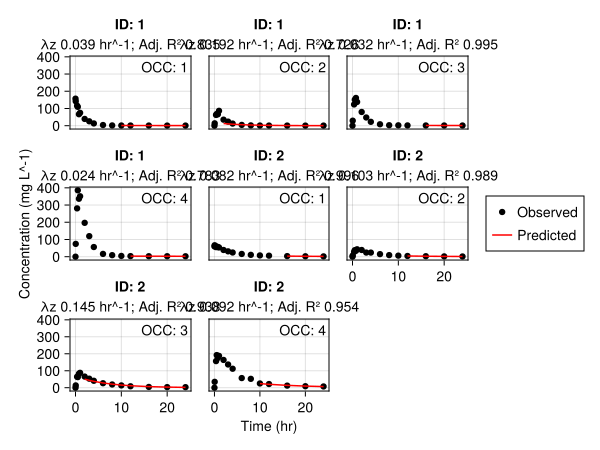
PlottingUtilities.subject_fits — Function
subject_fits(input_df)
subject_fits(figpos, input_df)
Keywords
llq: Set to a numeric value to display a horizontal line indicating the Lower Limit of Quantification (LLQ). Defaults tonothing(no line).threshold: Passed toNCA.run_ncafor lambdaz fitting. Defaults tonothing.adjr2factor: Passed toNCA.run_ncafor lambdaz fitting. Defaults tonothing.ids: Select which subject IDs to display. Can be either a single ID or aVectorof IDs. Note that the type of the ID must match those in the population, i.e. a value1is not the same as a"1".labels: The custom name to use for each individual series within in the plot such as a scatter or line. Provide aNamedTuplewith any of the following keys and your custom label string:observed,cpred, andremoved.paginate: (defaultfalse) Whentruesets the return type of a plot to aVector{AlgebraOfGraphics.FigureGrid}rather than a singleAlgebraOfGraphics.FigureGrid, splitting the returned plot over several "pages" if there are too many to fit on a single figure comfortably. See alsolimit,rows, andcolumnsfor controlling page size and grid shape.limit: Sets the maximum number of axes that can be plotted per page when pagination is active. Cannot be combined withrowsandcolumns.rows: Sets the number of rows per page when pagination is active. For plots with alayoutscale, must be specified together withcolumns. The grid shape is controlled viaAlgebraOfGraphics.wrapped(; cols = columns)and the page limit is computed asrows × columns. For plots withrow/colscales, translates directly to the corresponding pagination parameter.columns: Sets the number of columns per page when pagination is active. For plots with alayoutscale, must be specified together withrows. The grid shape is controlled viaAlgebraOfGraphics.wrapped(; cols = columns)and the page limit is computed asrows × columns. For plots withrow/colscales, translates directly to the corresponding pagination parameter.axis: A key-value object with axis options that gets passed to the underlyingAlgebraOfGraphics.drawcall.figure: A key-value object with figure options that gets passed to the underlyingAlgebraOfGraphics.drawcall. (Does not apply when plotting into an existing figure.)legend: A key-value object with legend options that gets passed to the underlyingAlgebraOfGraphics.drawcall. (Does not apply when plotting into an existing figure.) A legend will be drawn automatically unlesslegend = (; show = false)is set.facet: A key-value object with facet options that gets passed to the underlyingAlgebraOfGraphics.drawcall.colorbar: A key-value object with colorbar options that gets passed to the underlyingAlgebraOfGraphics.drawcall. (Does not apply when plotting into an existing figure.)
Supported Style Keywords
- `cpred_color`
- `cpred_linestyle`
- `cpred_linewidth`
- `removed_color`
- `removed_marker`
- `removed_markersize`
- `markercolor`
- `markerstyle`
- `group_fontsize`
- `llq_color`: Color of the LLQ line (default: `Makie.automatic`).
- `llq_linestyle`: Linestyle of the LLQ line (default: `Makie.automatic`).
- `llq_label`: Label for the LLQ line in the legend (default: "LLQ").
- `llq_linewidth`: Linewidth of the LLQ line (default: `Makie.automatic`).
Parameter distributions
parameters_dist(results; parameter = :auclast)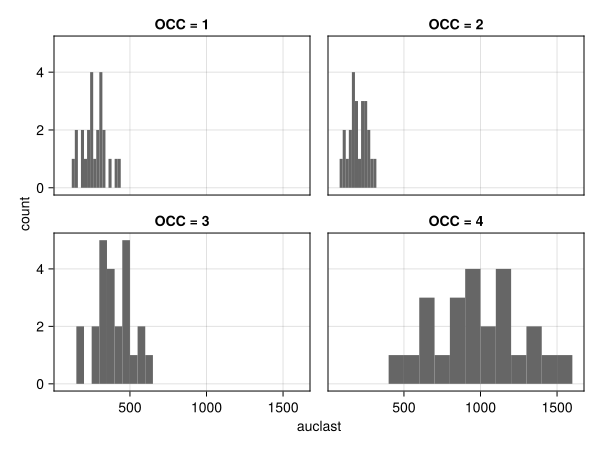
NCA.parameters_dist — Function
parameters_dist(report_df)
parameters_dist(figpos, report_df)
Keywords
parameter: The name of the parameter to plot given as aSymbol.group: Select which group from stratified input data to plot.paginate: (defaultfalse) Whentruesets the return type of a plot to aVector{AlgebraOfGraphics.FigureGrid}rather than a singleAlgebraOfGraphics.FigureGrid, splitting the returned plot over several "pages" if there are too many to fit on a single figure comfortably. See alsolimit,rows, andcolumnsfor controlling page size and grid shape.limit: Sets the maximum number of axes that can be plotted per page when pagination is active. Cannot be combined withrowsandcolumns.rows: Sets the number of rows per page when pagination is active. For plots with alayoutscale, must be specified together withcolumns. The grid shape is controlled viaAlgebraOfGraphics.wrapped(; cols = columns)and the page limit is computed asrows × columns. For plots withrow/colscales, translates directly to the corresponding pagination parameter.columns: Sets the number of columns per page when pagination is active. For plots with alayoutscale, must be specified together withrows. The grid shape is controlled viaAlgebraOfGraphics.wrapped(; cols = columns)and the page limit is computed asrows × columns. For plots withrow/colscales, translates directly to the corresponding pagination parameter.axis: A key-value object with axis options that gets passed to the underlyingAlgebraOfGraphics.drawcall.figure: A key-value object with figure options that gets passed to the underlyingAlgebraOfGraphics.drawcall. (Does not apply when plotting into an existing figure.)legend: A key-value object with legend options that gets passed to the underlyingAlgebraOfGraphics.drawcall. (Does not apply when plotting into an existing figure.) A legend will be drawn automatically unlesslegend = (; show = false)is set.facet: A key-value object with facet options that gets passed to the underlyingAlgebraOfGraphics.drawcall.colorbar: A key-value object with colorbar options that gets passed to the underlyingAlgebraOfGraphics.drawcall. (Does not apply when plotting into an existing figure.)
bins = 15: Number of histogram bins.link_histograms = false: Iftrue, uses the same histogram bins in each facet, with limits encompassing all data.
Supported Style Keywords
colorstrokecolorstrokewidth
Parameters by group
parameters_vs_group(results; parameter = :auclast)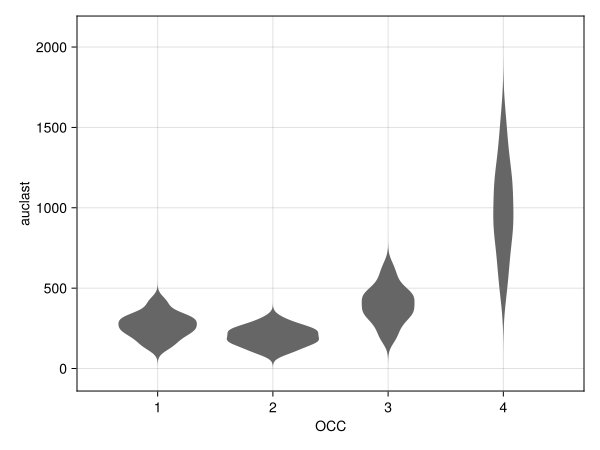
NCA.parameters_vs_group — Function
parameters_vs_group(report_df)
parameters_vs_group(figpos, report_df)
Keywords
group: Select which group from stratified input data to plot.parameter: The name of the parameter to plot given as aSymbol.type: Plot type for grouped data,:violin(default) or:boxplot.paginate: (defaultfalse) Whentruesets the return type of a plot to aVector{AlgebraOfGraphics.FigureGrid}rather than a singleAlgebraOfGraphics.FigureGrid, splitting the returned plot over several "pages" if there are too many to fit on a single figure comfortably. See alsolimit,rows, andcolumnsfor controlling page size and grid shape.limit: Sets the maximum number of axes that can be plotted per page when pagination is active. Cannot be combined withrowsandcolumns.rows: Sets the number of rows per page when pagination is active. For plots with alayoutscale, must be specified together withcolumns. The grid shape is controlled viaAlgebraOfGraphics.wrapped(; cols = columns)and the page limit is computed asrows × columns. For plots withrow/colscales, translates directly to the corresponding pagination parameter.columns: Sets the number of columns per page when pagination is active. For plots with alayoutscale, must be specified together withrows. The grid shape is controlled viaAlgebraOfGraphics.wrapped(; cols = columns)and the page limit is computed asrows × columns. For plots withrow/colscales, translates directly to the corresponding pagination parameter.axis: A key-value object with axis options that gets passed to the underlyingAlgebraOfGraphics.drawcall.figure: A key-value object with figure options that gets passed to the underlyingAlgebraOfGraphics.drawcall. (Does not apply when plotting into an existing figure.)legend: A key-value object with legend options that gets passed to the underlyingAlgebraOfGraphics.drawcall. (Does not apply when plotting into an existing figure.) A legend will be drawn automatically unlesslegend = (; show = false)is set.facet: A key-value object with facet options that gets passed to the underlyingAlgebraOfGraphics.drawcall.colorbar: A key-value object with colorbar options that gets passed to the underlyingAlgebraOfGraphics.drawcall. (Does not apply when plotting into an existing figure.)
Supported Style Keywords
colormarkersize
Dose linearity
sad = dataset("po_sad_1")
sad_results = run_nca(read_nca_pumas(sad; concentration = :dv, dose = :amt))
model = DoseLinearityPowerModel(sad_results, :cmax)

power_model(model)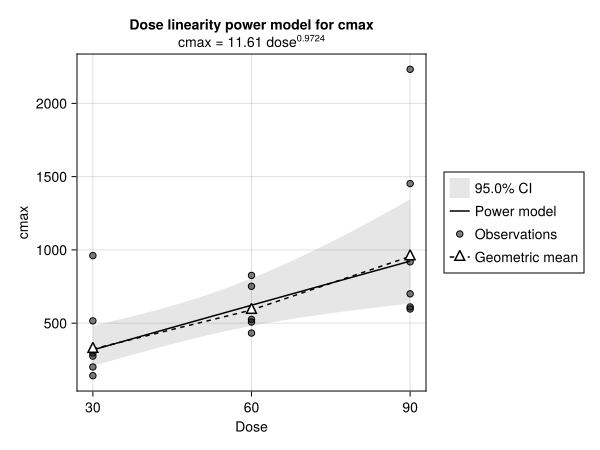
dose_vs_dose_normalized(sad_results, :cmax)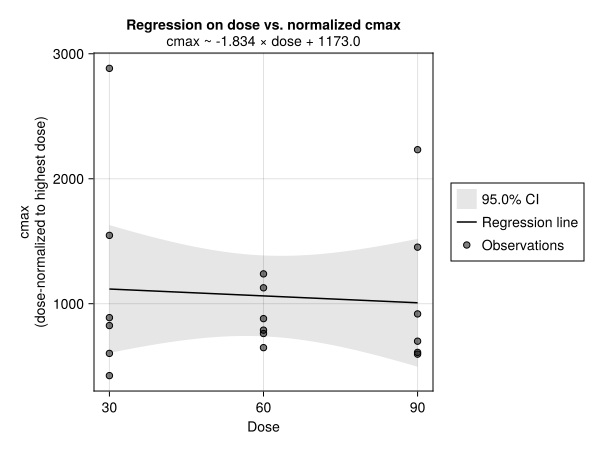
NCA.power_model — Function
power_model(dose_linearity_powermodel)
power_model(figpos, dose_linearity_powermodel)
Keywords
paginate: (defaultfalse) Whentruesets the return type of a plot to aVector{AlgebraOfGraphics.FigureGrid}rather than a singleAlgebraOfGraphics.FigureGrid, splitting the returned plot over several "pages" if there are too many to fit on a single figure comfortably. See alsolimit,rows, andcolumnsfor controlling page size and grid shape.limit: Sets the maximum number of axes that can be plotted per page when pagination is active. Cannot be combined withrowsandcolumns.rows: Sets the number of rows per page when pagination is active. For plots with alayoutscale, must be specified together withcolumns. The grid shape is controlled viaAlgebraOfGraphics.wrapped(; cols = columns)and the page limit is computed asrows × columns. For plots withrow/colscales, translates directly to the corresponding pagination parameter.columns: Sets the number of columns per page when pagination is active. For plots with alayoutscale, must be specified together withrows. The grid shape is controlled viaAlgebraOfGraphics.wrapped(; cols = columns)and the page limit is computed asrows × columns. For plots withrow/colscales, translates directly to the corresponding pagination parameter.axis: A key-value object with axis options that gets passed to the underlyingAlgebraOfGraphics.drawcall.figure: A key-value object with figure options that gets passed to the underlyingAlgebraOfGraphics.drawcall. (Does not apply when plotting into an existing figure.)legend: A key-value object with legend options that gets passed to the underlyingAlgebraOfGraphics.drawcall. (Does not apply when plotting into an existing figure.) A legend will be drawn automatically unlesslegend = (; show = false)is set.facet: A key-value object with facet options that gets passed to the underlyingAlgebraOfGraphics.drawcall.colorbar: A key-value object with colorbar options that gets passed to the underlyingAlgebraOfGraphics.drawcall. (Does not apply when plotting into an existing figure.)
Supported Style Keywords
colormarkersizemarkercolorstrokewidthgeomean_markersizegeomean_markergeomean_strokecolorgeomean_strokewidthgeomean_markercolorgeomean_linestylegeomean_colorband_color
NCA.dose_vs_dose_normalized — Function
dose_vs_dose_normalized(report_df, variable)
dose_vs_dose_normalized(figpos, report_df, variable)
Regress variable, normalized to the highest dose, on the dose column of report_df.
Arguments
report_df: The output ofrun_nca, with adosecolumn.variable: The endpoint column to plot, e.g.:cmax.
Keywords
level: Confidence level of the regression band. Defaults to0.95.paginate: (defaultfalse) Whentruesets the return type of a plot to aVector{AlgebraOfGraphics.FigureGrid}rather than a singleAlgebraOfGraphics.FigureGrid, splitting the returned plot over several "pages" if there are too many to fit on a single figure comfortably. See alsolimit,rows, andcolumnsfor controlling page size and grid shape.limit: Sets the maximum number of axes that can be plotted per page when pagination is active. Cannot be combined withrowsandcolumns.rows: Sets the number of rows per page when pagination is active. For plots with alayoutscale, must be specified together withcolumns. The grid shape is controlled viaAlgebraOfGraphics.wrapped(; cols = columns)and the page limit is computed asrows × columns. For plots withrow/colscales, translates directly to the corresponding pagination parameter.columns: Sets the number of columns per page when pagination is active. For plots with alayoutscale, must be specified together withrows. The grid shape is controlled viaAlgebraOfGraphics.wrapped(; cols = columns)and the page limit is computed asrows × columns. For plots withrow/colscales, translates directly to the corresponding pagination parameter.axis: A key-value object with axis options that gets passed to the underlyingAlgebraOfGraphics.drawcall.figure: A key-value object with figure options that gets passed to the underlyingAlgebraOfGraphics.drawcall. (Does not apply when plotting into an existing figure.)legend: A key-value object with legend options that gets passed to the underlyingAlgebraOfGraphics.drawcall. (Does not apply when plotting into an existing figure.) A legend will be drawn automatically unlesslegend = (; show = false)is set.facet: A key-value object with facet options that gets passed to the underlyingAlgebraOfGraphics.drawcall.colorbar: A key-value object with colorbar options that gets passed to the underlyingAlgebraOfGraphics.drawcall. (Does not apply when plotting into an existing figure.)
Supported Style Keywords
colormarkersizestrokecolorbandcolorstrokewidth